TmpMail – MailTro
A few days ago, my friend Parth and I started working on a temporary email service called MailTro. What began as a side project quickly turned into a serious learning experience—and it also became my first collaborative project.
Soon after launching, many people—especially colleagues at my office and members of my Discord groups—started asking how temporary email services actually work. The most common question was:
How does an email get received and displayed inside a tmpmail app?
How MailTro Works (High-Level Overview)
Yes, we use SMTP, but not a third-party service. We built our own custom SMTP server, called Box, written in Go. Its responsibility is intentionally minimal:
- Accept incoming emails
- Push raw email data into a queue
From there, all processing is handled by our backend system.
Our backend is built with Bun, and the frontend uses Next.js
(yes, we know the frontend needs improvement—and it’s already on our roadmap).
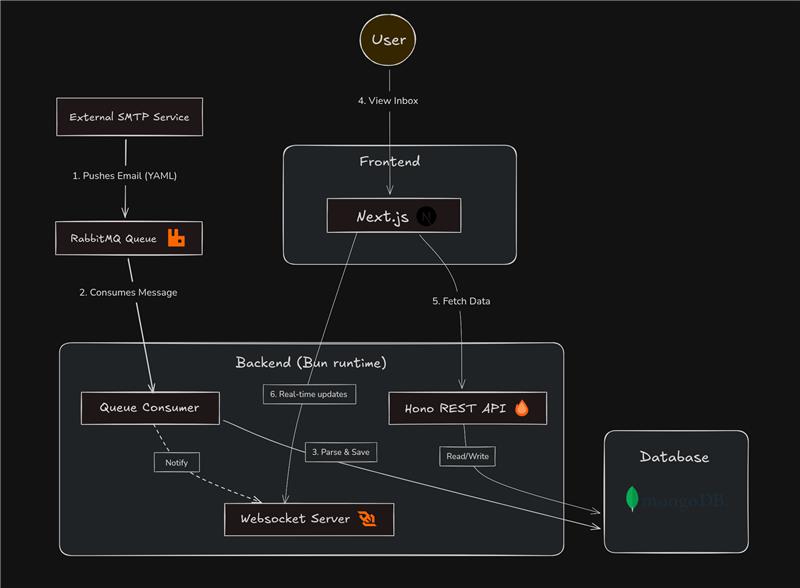
Backend Processing & Real-Time Delivery
Inside the backend:
- Incoming emails are consumed from a RabbitMQ queue
- Raw messages are parsed and normalized
- We verify whether the recipient exists on our platform
- If the user exists, the email is stored in their inbox
- If the user is currently connected, the message is pushed instantly via WebSocket
This gives us real-time inbox updates without turning the entire system into a fully real-time architecture.
Frontend Architecture Philosophy
The frontend is intentionally designed as a thin, backend-driven layer.
It does not own mailbox or message state. All critical decisions—such as identity, lifecycle rules, and data validity—are handled exclusively by the server. The client simply renders server-provided state.
This separation gives us several advantages:
- The frontend remains largely stateless and deterministic
- Horizontal scaling is trivial
- No risk of state divergence or duplicated domain logic
- Backend remains the single source of truth
Because of this model, frontend instances can scale independently without introducing consistency issues.
Real-Time Scope (By Design)
Real-time behavior is deliberately limited.
We use WebSockets only for inbound email delivery, where low latency actually matters.
All other interactions—such as fetching mail history or metadata—use conventional request–response APIs.
This hybrid approach:
- Avoids the complexity of fully real-time systems
- Keeps debugging and observability simple
- Still delivers instant feedback where it provides real value
The frontend treats server events as authoritative state updates, not user-driven mutations.
Authentication & Identity Handling
Authentication is handled strictly at the transport boundary.
- The server issues a token
- The frontend attaches it to each request
- The client has no awareness of user identity beyond access validation
The frontend never enforces business rules or identity logic.
Combined with a constrained UI interaction surface, this approach:
- Reduces edge cases
- Simplifies failure handling
- Keeps the frontend focused purely on rendering state
Seamless Login & Email Lifecycle
MailTro uses a seamless login experience:
- On first visit (or after 15 days), a new temporary email address is generated
- If the user returns within the valid window, we restore the existing mailbox
Lifecycle rules:
- Temporary email addresses expire after 15 days
- Emails are automatically deleted after 7 days
We’re planning to add a feature that allows users to extend the lifetime of an email address after a certain usage threshold.
Domains & Customization
Currently, MailTro supports three domains for temporary email addresses.
Users can:
- Shuffle email addresses
- Customize the username before the
@<domain>
What’s Next
Our next major focus is UI and email rendering.
We’ve noticed that:
- Some email styles don’t render well
- Dark mode can make certain emails difficult to read
Improving email rendering consistency and accessibility is a high priority.
Special Thanks
A special thanks to Sahil Kapdia and Tanuj Patra for reporting a significant delay when receiving emails from Gmail.
The issue turned out to be a DNS configuration problem, which has now been resolved.